
MOLI Production Kiosks
where the physical world meets the digital — at every workcenter
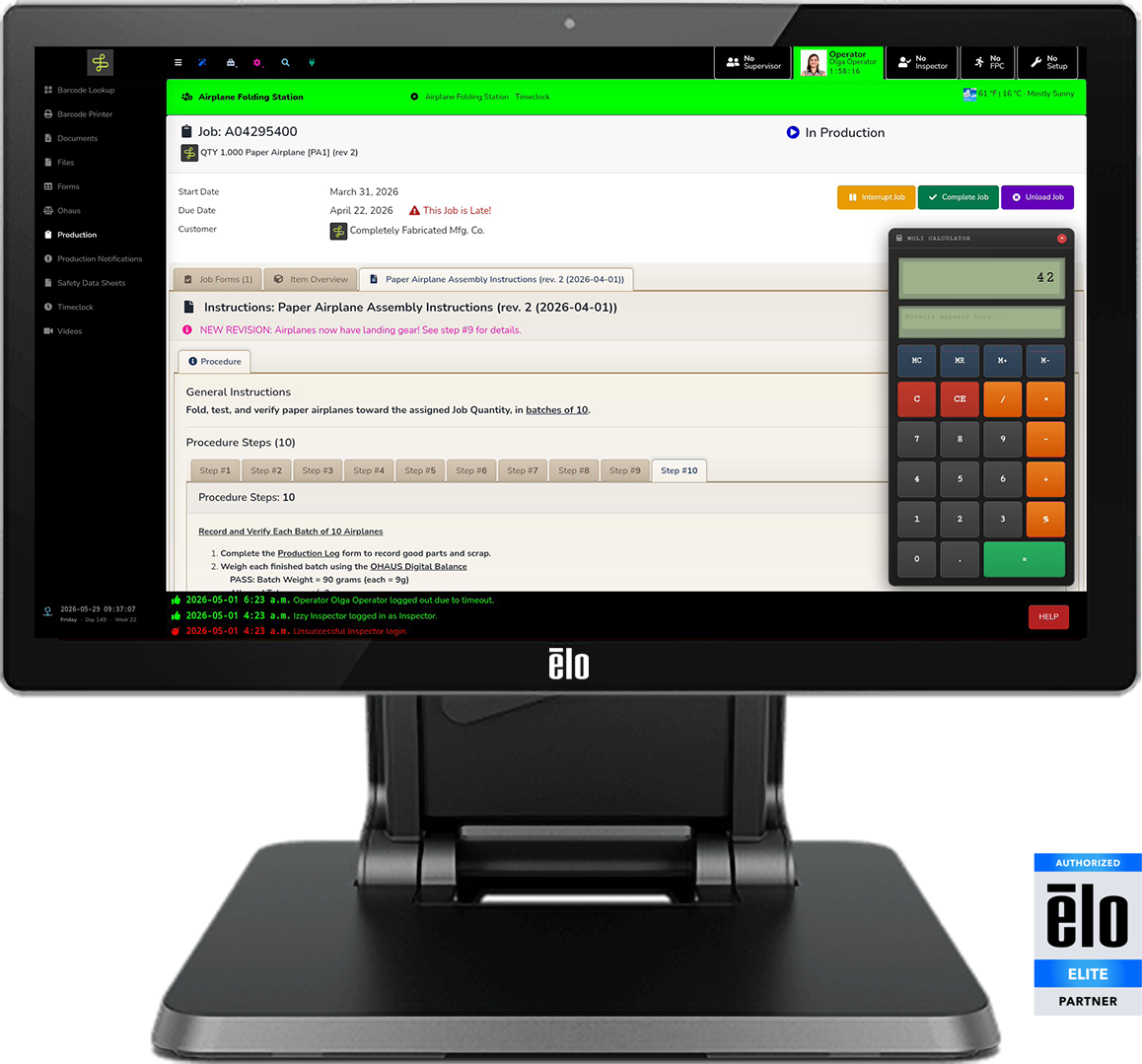
A kiosk that knows the job.
Paper travelers got you here.
MOLI Production Kiosks get you further.
Most software stops at the screen. MOLI connects to everything at the workcenter — barcode scanners, printers, measurement instruments, sensors, stacklights, and the machine itself — while staying fluent with your ERP, MES, QMS, and other key systems.
The right information at the right place, delivered to the right people at the right time — automatically — integrated. That's the MOLI advantage.
What Operators Can Do at Each Kiosk
Job Management
- View all jobs assigned to this workcenter at current status
- Transition job status: Start → In Production → Complete / Interrupt
- Flag jobs with configurable flags (e.g. black flag, quality hold)
- View associated items with BOM, drawings, and linked resources
- Scan a traveler, label, or other barcode to load a job instantly
- View and resolve Production Notifications for this workcenter
Work Instructions & Training
- Role-specific, revision-controlled Electronic Work Instructions (EWI)
- Training verifications with e-signature and operator photo capture
- Configurable-pass-threshold assessments tied to the job or item
- Skill matrix awareness — only what this operator is qualified to run
- Safety data sheets and compliance documents always accessible
- Arbitrary documents, files, photos, videos — no job context required
Forms & Data Capture
- Smart forms pre-populated with operator, machine, job, and time
- Barcode, RFID, and camera scan directly into form fields
- Metrology data from connected USB/RS-232 instruments or sensors
- Barcode label printing from any form field or job / item record
- HELP button — one press escalates to the right supervisor
- All actions logged with who, what, when, and where
Multi-Session Architecture
Operator Sessions
- Multiple operators can sign in to the same kiosk
- Log in by badge scan, barcode, keyfob, or employee ID #
- Load job; status transitions and work instructions
- Forms, assessments, and training verifications
- HELP button always present
- Full MOLI Toolbox access
Supervisor Overlay
- Tap to enter — operators stay active
- View and resolve escalations and notifications
- Job approvals, overrides, sign-offs
- Explicit Mode limits scope to this workcenter
- Session drops away automatically on timeout
- Credential enrollment (e.g. barcodes, keyfobs)
MOLI Production Kiosk vs. a Typical Web App
- Workcenter context: knows machines, workcenters, jobs, shift, and operators automatically — a typical web app makes the user navigate and select
- Identity / authentication: Employee ID, barcode, keyfob, RFID — kiosk-optimized single factor, full MFA when required — instead of username/password with no physical credential integration
- Concurrent user sessions: operators + inspector + FPC + supervisor simultaneously, no logoff required — instead of a single session where switching users requires a full logout
- Permission scoping: Explicit Mode constrains permissions to the functionality of the specific location — instead of a user carrying full permissions regardless of where they log in
- Barcode / RFID integration: native — triggers workflows, populates forms, authenticates users, does lookups
- Label printing (ZPL): direct ZPL to Zebra printers; direct PDF to most IPP/RAW networked printers — instead of browser print only
- Metrology / instrument data: USB/RS-232 instruments and sensors write directly into form fields or a dedicated interface — instead of manual transcription
- Edge Connect peripherals: scanner, RFID/NFC, MSR, audio interface, status light — no cables, powered by the kiosk
- Device management: EloView / Knox MDM included in the MOLI license
MOLI Certified Production Kiosk Devices
MOLI Kiosks are part of a certified ecosystem that also includes Mobile Devices, Digital Signage Devices, Barcode Scanners, Label Printers, Smart Stacklights, metrology instruments, sensors, ERP integrations, mounting hardware, consulting, training, and implementation services.
- Fixed Kiosk: Elo I-Series 5 21.5″ (preferred)
- Fixed Kiosk: Elo I-Series 5 10.1″
- Mobile: Zebra TC501 6″ Handheld (preferred)
- Mobile: Zebra TC22 6″ Handheld
- Mobile: Zebra ET401 10″ Tablet (preferred)
- Mobile: Samsung Galaxy A9